


TVCastHub
2.912.00 Reviews
App Specs
- Version
- 1.0.3
- Updated On
- License
- Free
- Downloads
- 10,000+
- Developer
- Bloomscape Interactive
- Categories
- Tools
- Platform
- Android
Screenshots
 Analysis by AppCompare
Getting a video from a phone onto a television sounds simple until the moment you actually want to do it. You find a clip, open the sharing menu, search through device lists, wait for the TV to respond, and then discover that the television is on a different network or that the app you are using does not handle casting in the way you expected. TVCastHub is built around that recurring annoyance: it is a free tools app for casting videos to a TV or another screen, with the goal of making the phone-to-screen step feel less like troubleshooting.
After spending time with it, my view is fairly practical. The app can be useful when you regularly move video viewing from a small phone display to a larger screen, especially if you want one place to begin that process instead of jumping between unrelated apps. At the same time, its modest user response matters. It has an average rating of 2.9 from around thirty ratings, so I would not approach it as a universally dependable replacement for the casting tools already built into your phone, television, or streaming service.
That balance is important here. TVCastHub is not something I would install simply because the name promises a bigger screen. I would install it when casting is a repeated part of my routine and I am willing to test whether it fits my particular TV and network setup. The time it can save is real, but the value depends heavily on how consistently the connection behaves in your home.
What TVCastHub is trying to simplify
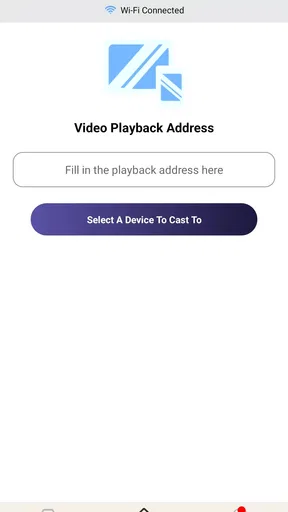
The basic idea is easy to understand. Instead of treating casting as a separate technical task every time, the app gives you a dedicated starting point for sending video from an Android phone to a television or screen. Bloomscape Interactive is the developer, and the app sits in the tools category rather than presenting itself as a streaming service with its own catalog.
That distinction changes how I judge it. TVCastHub is useful as a bridge between content already available to you and the screen where you want to watch it. It is not the reason to subscribe to a video service, and it does not replace the service that supplies the video. Its job is closer to removing the awkward middle step between “I found something on my phone” and “I want everyone in the room to see it on the TV.”
In a normal evening scenario, I might find a short video while sitting on the sofa, decide it is worth showing someone else, and prefer not to pass the phone around. A casting utility is helpful if it lets me identify the television quickly and start playback without opening several menus. That is the kind of small convenience that can justify keeping an app installed, even though the task itself sounds minor.
The same workflow is useful outside entertainment. You could use a larger screen for a personal video, a saved demonstration, a travel clip, or material you are reviewing with another person. The practical advantage is not that the television becomes smarter; it is that the phone becomes a more convenient controller for content that is easier to see on a larger display.
Worth Reading Before You Choose

EA SPORTS FC Mobile 26 Is a Bigger Football Game, but It Takes Time

Flipboard Shows What News Apps Must Do Beyond the Feed

Switching to Android Auto Means Rethinking Your Driving Routine

Google Calendar Makes a Crowded Week Easier to Manage

Ludo King Makes the Most of the Minutes Between Plans

Baby Panda World Brings Quick Play to Modern Phones, but Its Game Library Feels Busy
The first setup deserves patience
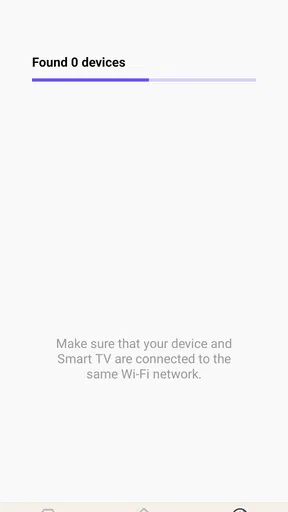
My first recommendation is to treat the initial connection as a compatibility check rather than assuming everything will work instantly. Put the phone and the target television on the same home network, open the app, and give yourself a moment to see whether the screen appears. If the TV is asleep, switching inputs or waking it before starting can save unnecessary confusion.
This is one of the less obvious ways to reduce friction: begin with the television ready to receive a connection, not with the phone already searching while the TV is idle. A casting app can only make the discovery process easier; it cannot eliminate the networking conditions required for the devices to communicate.
I would also test with a short, unimportant video before planning a group viewing session. That quick trial tells you whether the selected screen responds, whether playback begins as expected, and whether the phone remains useful as a controller. It is a better use of time than finding a long video first and then discovering a connection problem when everyone is waiting.
Because the app is still on version 1.0.3, I would keep expectations measured during setup. A version number like this does not tell me how well it will behave with every television brand or network arrangement. It does tell me to pay attention to the actual experience on my devices rather than assuming that a successful connection on one screen guarantees the same result elsewhere.
The app supports devices running Android 5.0 or later, which gives it a broad technical starting point for Android users. That does not automatically mean every older phone will feel equally smooth, though. The phone’s age, wireless performance, and the TV’s own casting support can all affect the result. If your handset is old, I would avoid judging the app solely by how quickly a newer device discovers the screen.
A better way to use it during the day
The most efficient workflow is to decide in advance what role the app has in your home. If it is your general-purpose video casting tool, use it as the first place you try when the content is already on your phone. If a particular service offers its own cast button and that button works reliably, I would normally use the service’s built-in option instead. It usually keeps the playback relationship clearer and avoids adding another layer.
That does not make TVCastHub unnecessary. Its value appears when the built-in route is inconvenient, inconsistent, or unavailable for the material you want to show. In that situation, having a dedicated utility gives you a repeatable fallback. The important trade-off is that a fallback should be tested before you depend on it; otherwise, you may simply replace one uncertain step with another.
I also found it helpful to separate discovery from playback. First confirm that the television is visible and selected. Then start the video. Doing both at once makes it harder to tell whether a problem comes from the network, the chosen screen, or the video source. This simple habit is more useful than repeatedly tapping the cast control and hoping the next attempt behaves differently.
For shared viewing, keep the phone close enough to remain responsive but do not treat it as the screen itself. The point of the app is to move attention to the television. If the phone is still being used for unrelated tasks while the video is playing, interruptions and accidental navigation become more likely. A dedicated casting session works best when the phone acts as a quiet remote rather than a second entertainment device.
Where it can save time in real situations
The clearest everyday use is spontaneous sharing. Someone sends me a video in a chat, I open it on my phone, and I want to show it to a room without asking everyone to crowd around a small display. TVCastHub makes sense in that moment because it focuses on the transition from handset to television. The time saved is not measured by a dramatic feature; it comes from avoiding the repeated search for a compatible route.
Another useful situation is reviewing several clips with another person. For example, if I am comparing travel videos, checking footage from a hobby, or looking through family recordings, a television makes the discussion easier. Casting each item from the phone can keep the process more flexible than transferring files first. The trade-off is that the experience depends on the connection remaining stable as I move from one item to the next.
It can also help when the phone is the place where content arrives first. Links, downloaded material, and clips shared by friends often appear on a handset before they are available through a television app. A casting utility gives those items a possible route to the larger screen without requiring me to search for the same content again using the TV remote.
For a small gathering, I would use the app as a convenience tool rather than as the foundation of the entire event. Test it beforehand, keep the phone charged, and have a second option ready if the television does not appear. That preparation may sound excessive for a simple video, but it prevents the app from becoming the center of attention when the goal is to share something quickly.
There is a quieter use case too: showing visual material while keeping the phone in hand. If I am explaining something to one other person, the phone can remain the control point while the television provides the shared view. This is more comfortable than repeatedly turning the handset toward someone else, especially when the details are too small to read on the phone.
What the app removes from the usual process
The main friction it addresses is decision fatigue. Without a dedicated utility, I may try the video app’s cast button, the phone’s quick settings, the television’s own input menu, and perhaps a manufacturer-specific application. Each route can be reasonable on its own, but switching among them wastes time. TVCastHub offers a single place to begin, which is valuable when I do not want to remember which method worked last time.
It can also make the phone-to-TV relationship easier for less technical household members. A person who does not want to learn every television menu may prefer opening one familiar tool and looking for the available screen. The app is most helpful in that role when the device list is clear and the connection process behaves predictably.
Still, I would not confuse a simpler starting point with a guaranteed connection. If the network is split between separate bands or guest access, the phone and television may not see each other. A casting app cannot repair that arrangement by itself. When discovery fails, checking the network is more productive than repeatedly reinstalling or reopening the app.
Another trade-off concerns control. A dedicated casting tool may be more convenient for initiating playback, but the original video service can remain the better place for account features, recommendations, captions, playback history, or content protection. If those parts matter, I prefer the service’s own television application or official cast control. TVCastHub is strongest when the problem is getting video onto the screen, not when I need a complete television viewing ecosystem.
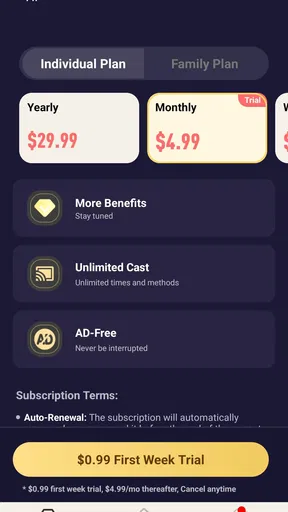
The app is free to install, which lowers the barrier to testing it. It also includes in-app purchases ranging from $1.99 to $49.99 per item. I would therefore explore the free experience first and avoid assuming that every useful part of the workflow is included without an additional purchase. The broad range means it is especially sensible to understand what you actually need before paying for anything.
Who should use it, and who should skip it
I would recommend trying TVCastHub if you often have video on an Android phone that you want to show on a television, especially when the usual route changes from one situation to another. It may suit households where several people share one screen and need a straightforward way to begin casting without navigating the TV’s menus every time.
I would be more cautious if your television already has a reliable official casting feature and the apps you use provide their own dependable cast controls. In that case, adding TVCastHub may not save time. It could simply create another choice in a process that is already working. The same applies if you rarely cast video; occasional users may be better served by the tools already included with the phone and TV.
People who expect universal compatibility should also look elsewhere or test carefully. The user rating of 2.9 suggests that the experience has not been consistently satisfying for everyone who tried it. I cannot treat that as a technical diagnosis, but it is enough to make reliability a central part of the decision. Install it because your workflow needs a casting helper, not because you expect a guaranteed solution for every screen.
The Everyone age rating makes it suitable for a broad audience from a content-rating perspective. That does not change the need to supervise what is being played, of course. The app provides a route to display video; the suitability of that video still depends on the source and the people watching.
My verdict after weighing convenience against reliability
TVCastHub is a focused utility with a sensible purpose: reduce the repeated hassle of moving phone video to a television. I like the idea of having one dedicated starting point, and I can see it saving time in homes where casting is frequent but not always handled through the same service. Its best quality is practical rather than flashy. When the phone and TV are ready, a dedicated workflow can make spontaneous sharing feel less awkward.
My reservations are just as practical. A casting app is only as useful as its device discovery and playback stability, and the rating around three stars tells me not to overlook that part of the experience. The app’s current version, 1.0.3, also encourages a trial-first approach. I would test it with the exact phone, television, and network I plan to use, then keep it only if it removes steps rather than adding new ones.
For me, the deciding question is simple: does it make the next casting session faster than the method I already use? If the answer is yes, the free installation makes experimenting reasonable. If the television already responds instantly to its official controls, I would skip the extra layer. My recommendation is cautious but positive for frequent Android video casting: try it as a practical fallback, judge it by repeat reliability, and do not pay for additional functionality until the basic workflow has earned a place in your routine.
Pros
- Simple interface makes browsing available TV content straightforward.
- Supports convenient access to channels from a mobile device.
- Useful option for users seeking entertainment in one central app.
- Content discovery is quick with clearly organized sections.
- Can be a practical companion for watching while traveling.
Cons
- Channel availability may vary by country or change without notice.
- Streaming quality depends heavily on your internet connection.
- Some content may include frequent ads or promotional interruptions.
- The app may require external players for certain streams.
- Privacy and data-use policies should be checked before creating an account.
FAQs for TVCastHub
What is TVCastHub and what can I use it for?
TVCastHub is designed to help users stream or cast video content from a mobile device to a compatible television or streaming receiver. It can be useful for watching supported online videos on a larger screen, depending on the source, device, and network connection. Before downloading, check the app’s current description and compatibility information because available features may vary between Android, iOS, television brands, and regional versions.
Which devices and televisions are compatible with TVCastHub?
Compatibility depends on the phone or tablet, the television or receiver, and the casting technology supported by both devices. In general, users should look for support for common smart-TV, Chromecast, AirPlay, or similar casting standards. The mobile device and television normally need to be connected to the same Wi-Fi network. It is advisable to verify the app-store requirements and TVCastHub’s supported-device list before installing.
Does TVCastHub include movies, channels, or other content to watch?
TVCastHub should not automatically be assumed to provide a catalog of movies, live channels, or premium video subscriptions. Its main purpose may be casting or controlling content available from supported sources, while the actual media can depend on third-party websites, applications, or services. Some content may require a separate subscription, account, or payment, so review the app’s current terms and content-source information before relying on it for entertainment.
Why might TVCastHub fail to connect or stop playing a video?
Connection and playback problems can result from several causes, including different Wi-Fi networks, weak signal strength, outdated television software, unsupported video sources, or restrictions imposed by the content provider. Restarting the app and receiver, confirming that both devices use the same network, and updating the relevant software can often help. If problems continue, the source may not support casting or the device may not be compatible.
Is TVCastHub free to download, and are there in-app purchases or privacy concerns?
The download price, advertising model, subscriptions, and in-app purchases can change according to the platform and region, so users should inspect the Google Play or App Store listing before installation. It is also important to read the requested permissions and privacy policy, particularly if the app accesses local-network devices, browsing activity, or usage information. Avoid entering sensitive payment details unless the purchase terms are clear and trustworthy.


